


Applicable Scope
This guide applies to Gate Web
Before you start: Prepare a valid payment method (bank card, e-wallet, or other supported payment options)
Estimated time: 10 m
Objective
This guide will walk you through how to purchase USDT on Gate Web.
Steps
Step 1: Register and Complete Account Verification
- Visit the Gate official website and click the "Sign Up" button in the upper right corner.
- Enter your email address and password, then follow the prompts to complete the registration process.
- After logging in, navigate to account settings and complete identity verification (KYC) by submitting the required documentation.
Step 2: Choose Your Purchase Method
Gate offers two main methods to purchase USDT:
- Quick Trade: Direct purchase with fixed rates
- P2P Trading: Trade directly with other users at negotiated rates
Select the method that best suits your needs and proceed to Step 3 or Step 4 accordingly.
Step 3: Purchase USDT via Quick Trade
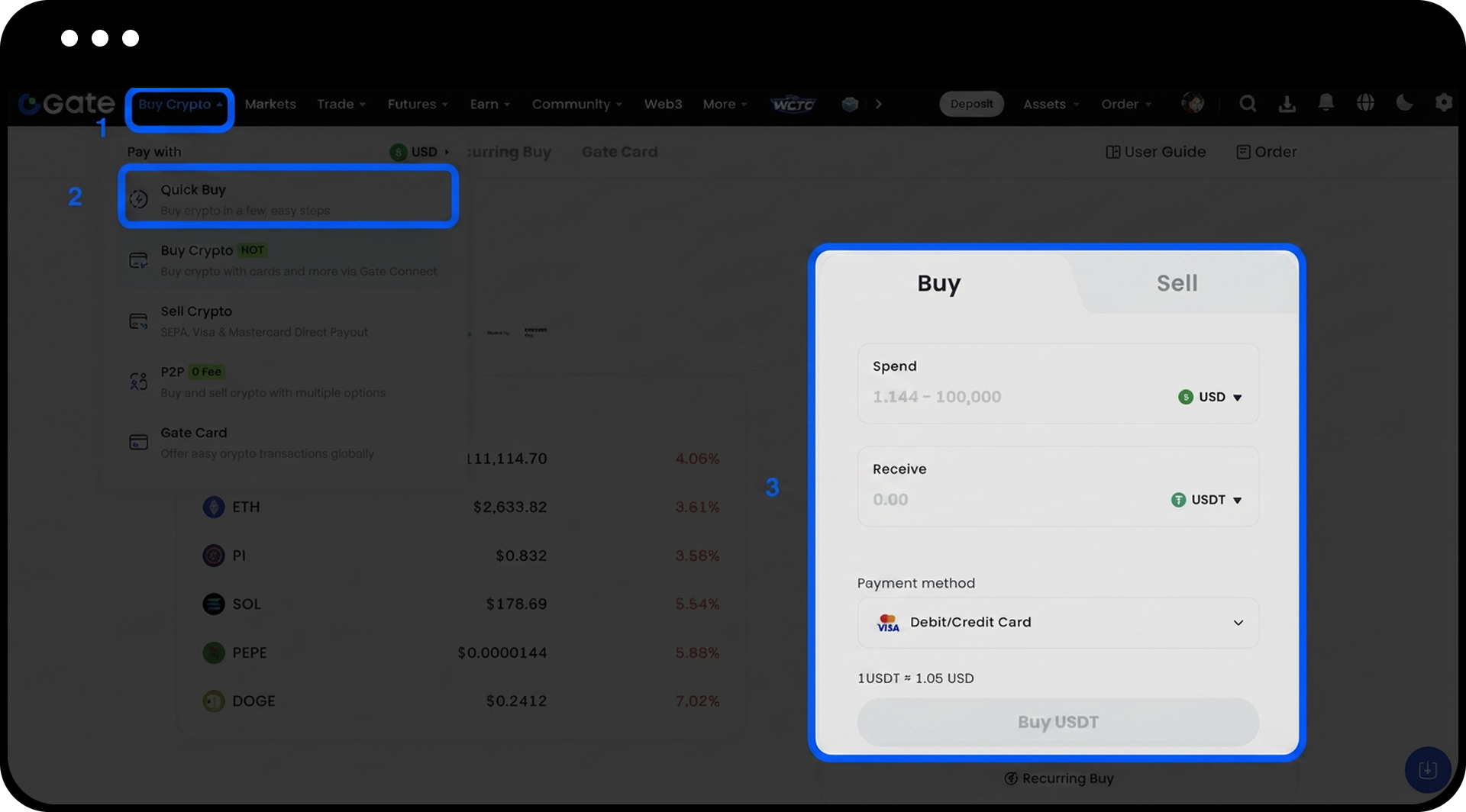
- Click "Buy Coins" on the homepage navigation bar.
- Select "Quick Exchange" from the dropdown menu.
- Choose "Buy" and select USDT as the purchasing coin.
- Enter the purchase amount or quantity you wish to buy.
- Click "Buy USDT".
- Select your preferred payment method from the available options.
- Review the transaction information and click "Buy Now".
- Complete the payment following the on-screen instructions.
- Wait for the system to confirm the transaction. Once confirmed, USDT will be credited to your account.
Step 4: Purchase USDT via P2P Trading
- Navigate to the "P2P Trading" page from the main menu.
- Browse the available USDT selling advertisements and select a seller based on:
- Price
- Payment methods accepted
- Transaction limits
- Seller's completion rate and reviews
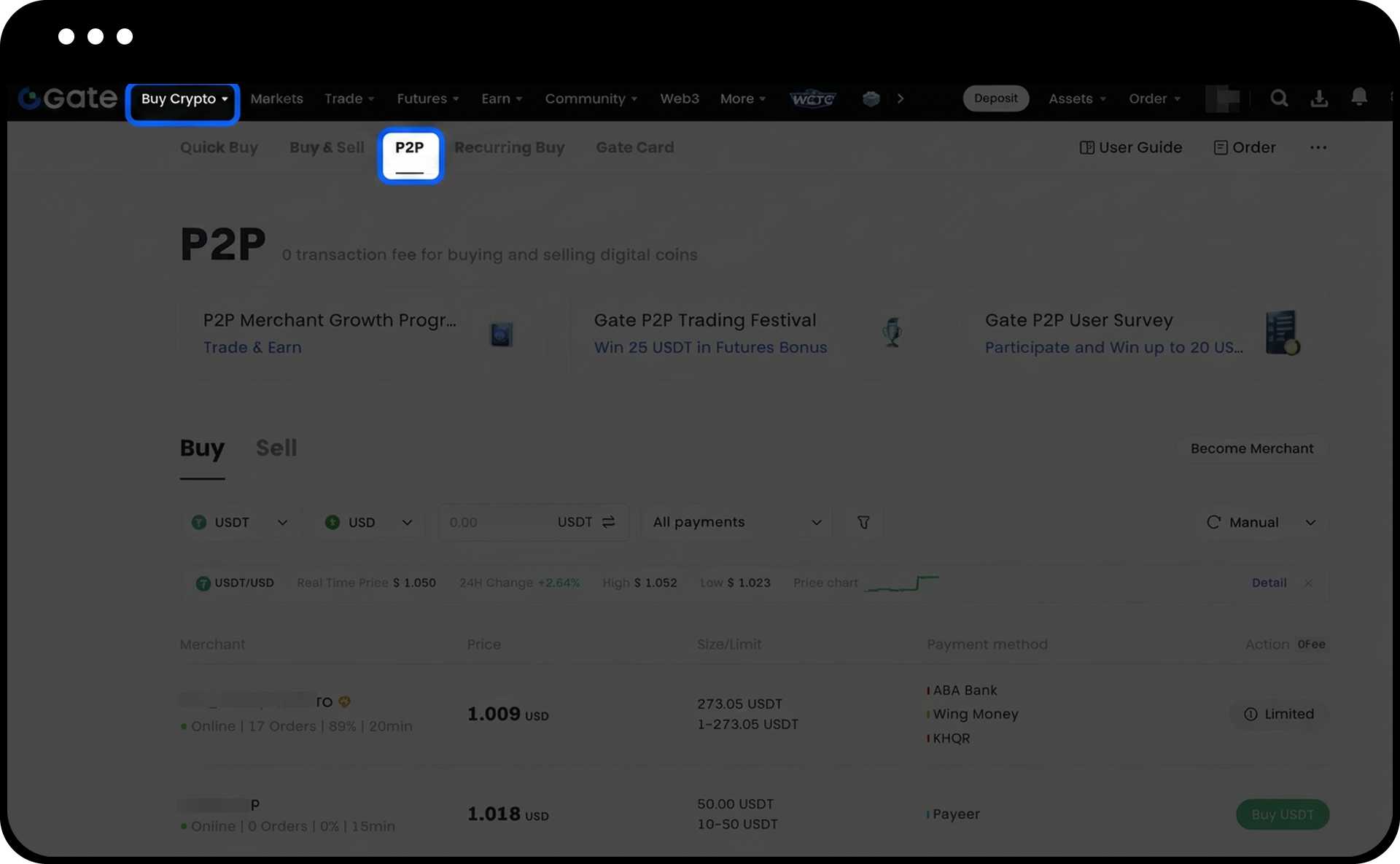
- Enter the quantity of USDT you wish to purchase.
- Review the order details carefully and click "Buy USDT".
- Complete the payment using the payment method specified by the seller.
- Click "I have paid" to notify the seller.
- Wait for the seller to confirm receipt of your payment. Once confirmed, USDT will be transferred to your Gate account.
Step 5: Enable Security Features
- Navigate to account settings and enable Two-Factor Authentication (2FA).
- Set up your preferred 2FA method (SMS, authenticator app, or email).
- Consider enabling additional security features such as withdrawal whitelist and anti-phishing code.
Notes
- You must complete KYC verification before you can deposit or withdraw funds from your Gate account.
- Different payment methods may have varying processing times and fees. Review the details before confirming your transaction.
- For P2P trades, always verify the seller's reputation and transaction history before initiating a trade.
- Never share your payment confirmation details or account credentials with anyone claiming to be Gate support.
- USDT purchased will be credited to your Spot account by default. You can transfer it to other accounts (Futures, Margin, etc.) as needed.
FAQ
Q1: How long does it take for USDT to arrive in my account after purchase?
A: For Quick Trade, USDT is typically credited within 1-5 minutes after payment confirmation. For P2P Trading, the time depends on the seller's confirmation speed, usually within 15-30 minutes after you click "I have paid."
Q2: What should I do if I haven't received USDT after completing payment in P2P Trading?
A: If the seller hasn't released USDT within the specified time frame, you can open a dispute through the order page. Gate's customer support team will investigate and resolve the issue.
Q3: Can I purchase USDT without completing KYC verification?
A: You can register an account without KYC, but you must complete identity verification before you can deposit, withdraw, or conduct certain trading activities. It is recommended to complete KYC verification to unlock all platform features.
Q4: Are there any limits on how much USDT I can purchase?
A: Purchase limits vary depending on your verification level, payment method, and the purchase method chosen (Quick Trade or P2P). Check the specific limits displayed during the transaction process.
Disclaimer
The content provided herein is for reference and educational purposes only and does not constitute any financial, investment, trading, or legal advice, nor does it constitute an offer or solicitation to buy or sell any digital assets. Gate makes no express or implied representations or warranties regarding the accuracy, completeness, or timeliness of the information contained herein. Product features, interfaces, rules, and fee structures may be updated or adjusted at any time. Please refer to the latest announcements and the actual information displayed on the Gate platform for the most accurate details.
Digital asset investments involve significant risk, and prices may fluctuate substantially. You may lose the entire amount of your investment. Please make decisions cautiously based on your own financial situation and risk tolerance after fully understanding the associated risks. If necessary, you are advised to consult an independent professional financial or legal advisor.
For more information about potential risks, please refer to Gate's Risk Disclosure and User Agreement.
